For macOS

Captions for your photos,
written by AI.

Browse your Mac folders or Photo Library, generate beautifully accurate captions with Google Gemini, and save the results back where you started.
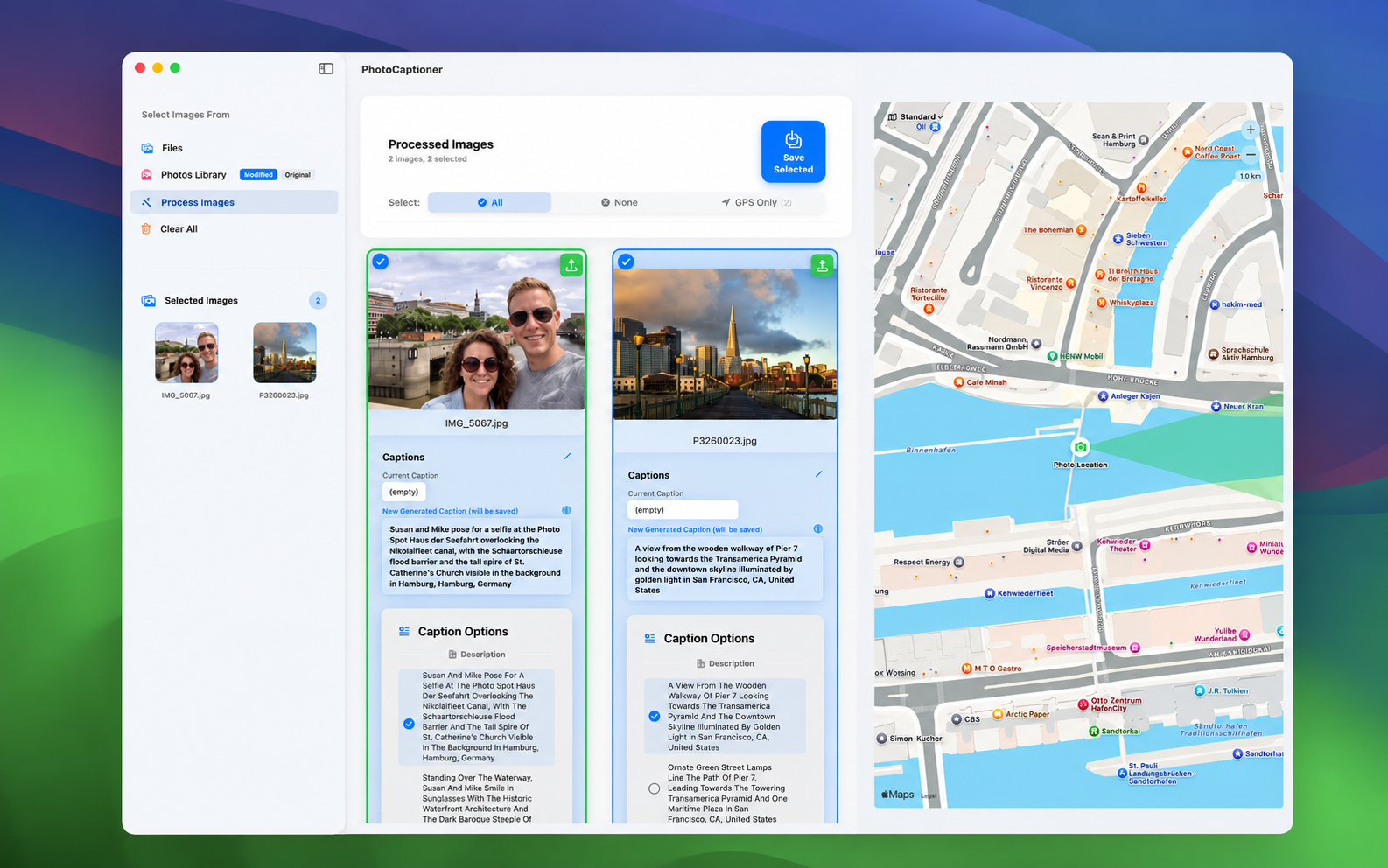
PhotoCaptioner AI app screenshot
Features

Everything you need to caption your photos.

Four tools, working together — designed natively for macOS.

AI Captions

Google's Gemini reads each photo and writes a caption with three alternates — landmarks, scenes, and people(from Photos Library) , recognized in seconds.

Photos Library Browser

Open any folder on your Mac or pull straight from the Photos app. Fast thumbnails, smart selection, and instant previews.

Folder Export

Captions are written directly into EXIF and IPTC metadata, then saved alongside the originals — no proprietary database, no lock-in.

Geotagged Maps

For photos with GPS data, see exactly where they were taken on an interactive map — all rendered locally on your Mac.

Highlights

Every detail, considered.

The full list of what's in the box.

Captions & AI

  • Powered by Google Gemini 3.5 Flash (free tier) or Gemini 3.1 Pro (with billing) for state-of-the-art image understanding
  • One primary caption plus three alternates per photo
  • Landmark recognition with Google Search grounding
  • Person-name embedding from IPTC metadata
  • Multiple language support for generated captions
  • On-device MobileNetV4 fallback when offline or quota-limited
  • Inline caption editor with live preview

Photos & Locations

  • Browse any folder on your Mac or import from the Photos app
  • Fast thumbnail grid with smart selection
  • Interactive map view for geotagged images
  • GPS-verified nearby place lookups via Google Places API (optional)
  • Configurable search radius and place types
  • Supports JPEG, HEIC, PNG, TIFF, and DNG/RAW formats
  • TIFF file creation for proprietary RAW files

Workflow & Export

  • Captions written directly into EXIF and IPTC metadata
  • Batch processing with progress tracking
  • Persistent SQLite cache — re-captioning is free
  • Designed for macOS 15 Sequoia and later
  • Sandboxed, signed, and notarized for the Mac App Store

Additional Features

  • Select detailed location from the settings window
  • Choose between Modified or Original images from the Photos Library
  • Select any segment of the caption and perform a web search
  • If desired, revert to the original caption
  • Re-process any previously processed image with different settings
  • Save all or selected images
  • Image caching option to prevent re-processing the same images
  • Tracking of total number of images processed

Privacy & Pricing

  • Bring your own Google API key — you control your usage
  • API keys stored only in the macOS Keychain, never transmitted to us
  • Zero analytics, zero telemetry, zero trackers
  • Photos never touch our servers — we don't operate any
  • 25-photo free tier, no account required
  • One-time $24.99 Pro Unlock — no subscription
  • All future updates included with Pro Unlock
Gallery

A closer look.

Click any image to view it full size.

Coming soon

Be the first to try PhotoCaptioner AI.

Available on the Mac App Store. One-time purchase, no subscriptions.

Coming Soon to the App Store